
The Problem with Selling Records Online
Vinyl grading is subjective. What one seller calls VG+, another might call VG. Buyers know this, and it creates hesitation. They wonder: does this record actually sound as good as the listing says? Is the surface noise acceptable? Are there skips the seller did not mention?
This uncertainty leads to two outcomes, both bad for sellers:
- Buyers pass on the listing entirely, unwilling to take the risk
- Buyers purchase and file a return when the record does not meet their expectations
Both outcomes cost you time, money, and your seller reputation.
Audio Previews Solve the Trust Problem
An audio clip eliminates the guesswork. Buyers hear the actual pressing quality, surface noise level, and fidelity with their own ears. They can judge for themselves whether the condition matches their standards. This builds trust and dramatically reduces returns.
Sellers who add audio previews to their vinyl listings report fewer disputes and more confident buyers — because the buyer has already heard the record before committing.
Recording a clip is easy. Play the record and record a 30–60 second sample from each side with your phone or a USB audio interface. The buyer does not expect studio quality. They want to hear the vinyl itself — surface noise and all. For more on the role of different media types, see product video vs photos: when to use each.
No Other Service Does This
Here is the surprising part: there is no major marketplace feature, no YouTube alternative, and almost no third-party service that focuses on audio embedding for e-commerce.
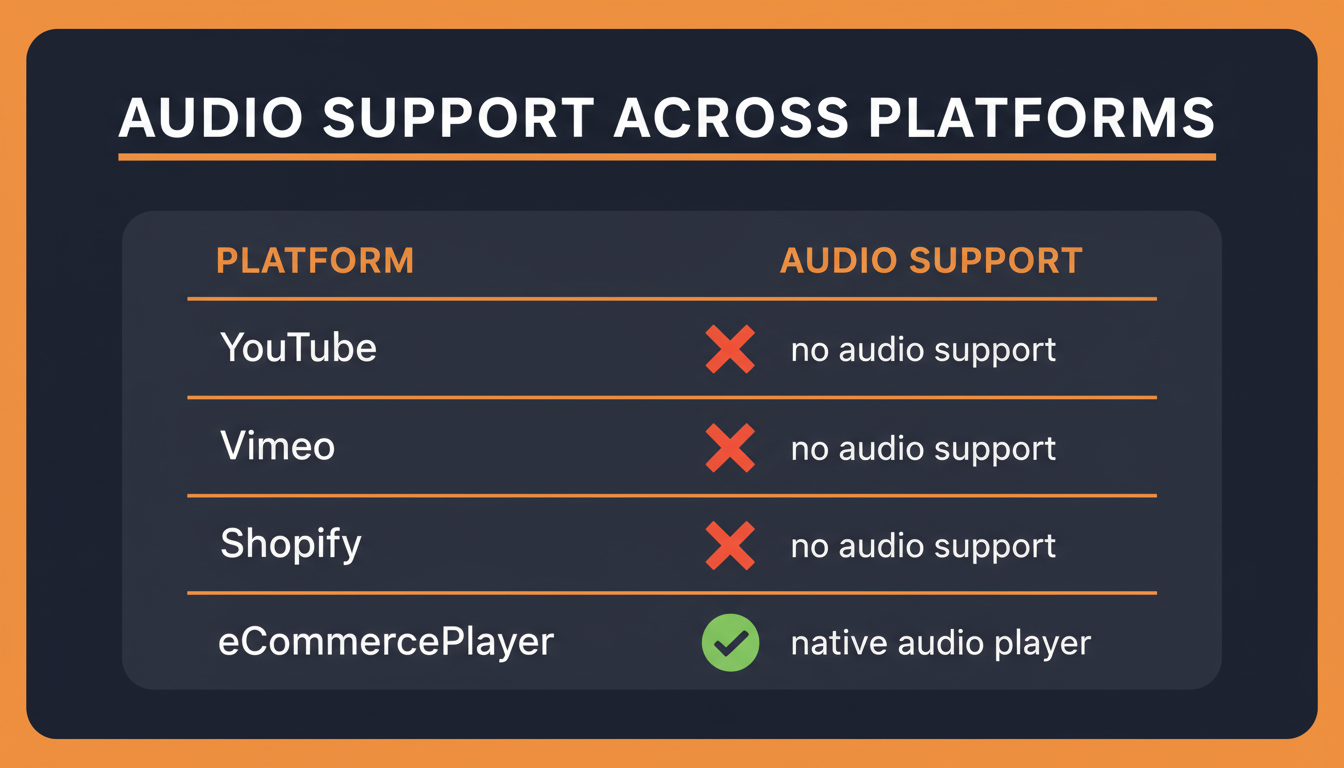
| Platform | Supports Audio Files? | Works in eBay Listings? |
|---|---|---|
| YouTube | No (video only) | No (active content banned) |
| Vimeo | No (video only) | No |
| Shopify native media | No | No |
| eCommercePlayer | Yes | Yes |
eCommercePlayer is purpose-built for this. Upload an MP3 or WAV file, create a player, and embed it in your eBay listing, Discogs page, or Shopify store. The free plan includes 5 clips. For more on the active content ban and how embedding works on eBay today, see how to add video to eBay listings after the active content ban. To understand the trade-offs of hosting options, see the true cost of free video hosting.
How to Get Started
Getting set up takes less than 15 minutes. Here is the full workflow:
- Record a short clip from each side of the record using your phone or audio interface
- Create a free eCommercePlayer account at ecommerceplayer.com
- Upload your audio files — MP3 and WAV are both supported
- Create a player and add both clips as a playlist
- Use the Image Link method to embed it in your eBay listing
Try it on one listing and see if it makes a difference. Most vinyl sellers who start using audio players never go back. If you also sell musical instruments, the same approach applies — see how to sell musical instruments online with audio and video.
Related Articles
Ready to add media to your listings?
Create your free account in under a minute. No credit card required.