
Nobody Is Watching Your Three-Minute Product Video
I am going to be honest with you: if your product videos are longer than 90 seconds, most buyers are not finishing them. They are probably not even making it past the first 30 seconds.
This is not because your products are boring. It is because of the context in which buyers watch product video. They are browsing. They have 15 tabs open. They are comparing your listing against three others. They want to see the product, confirm it matches the description, and make a decision. They do not want to watch a presentation.
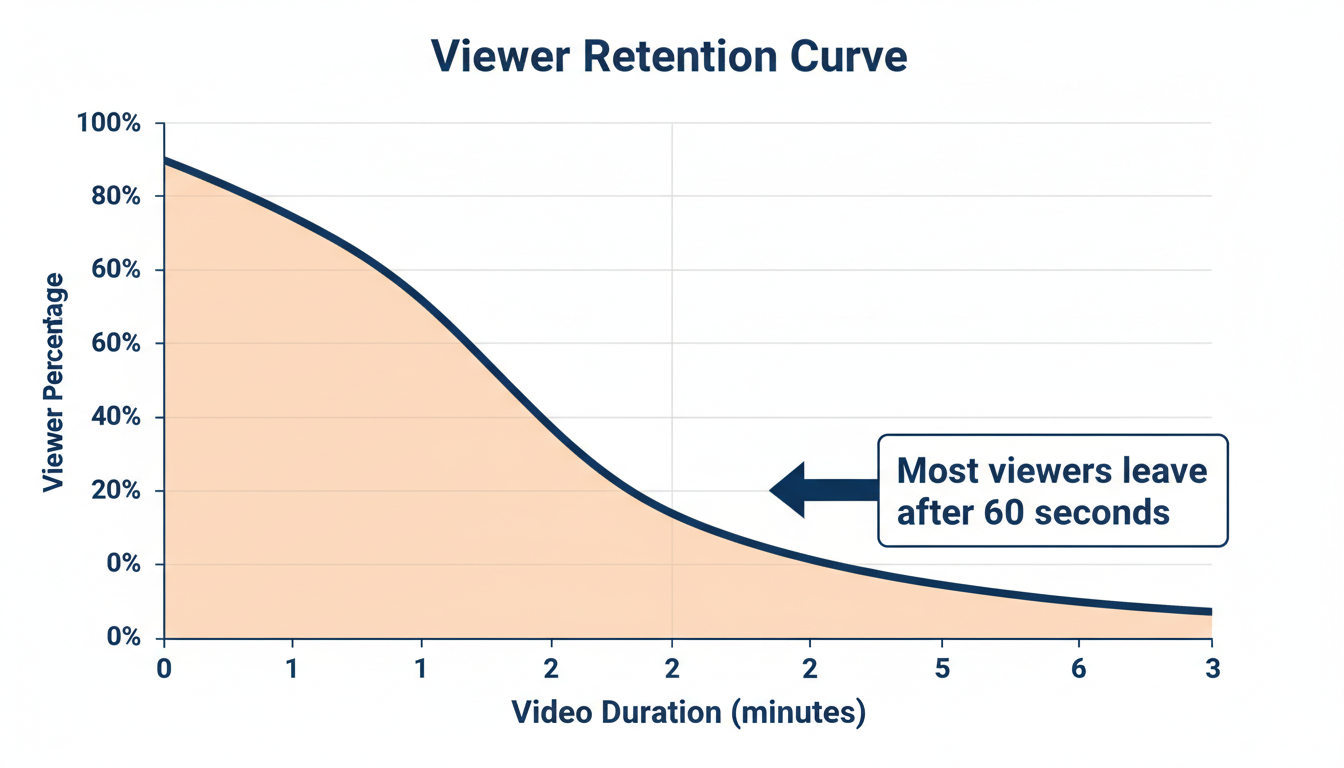
Platform analytics across e-commerce consistently show the same pattern: viewer engagement drops off sharply after 60 seconds. By the two-minute mark, you have lost more than half your audience. By three minutes, you are down to a small fraction of initial viewers.
Every second of video that plays after a buyer has already made up their mind is wasted effort.
The 60-Second Structure That Works
Here is a simple framework that works well for thousands of product listings. Think of your video in three parts: overview, details, and closing.
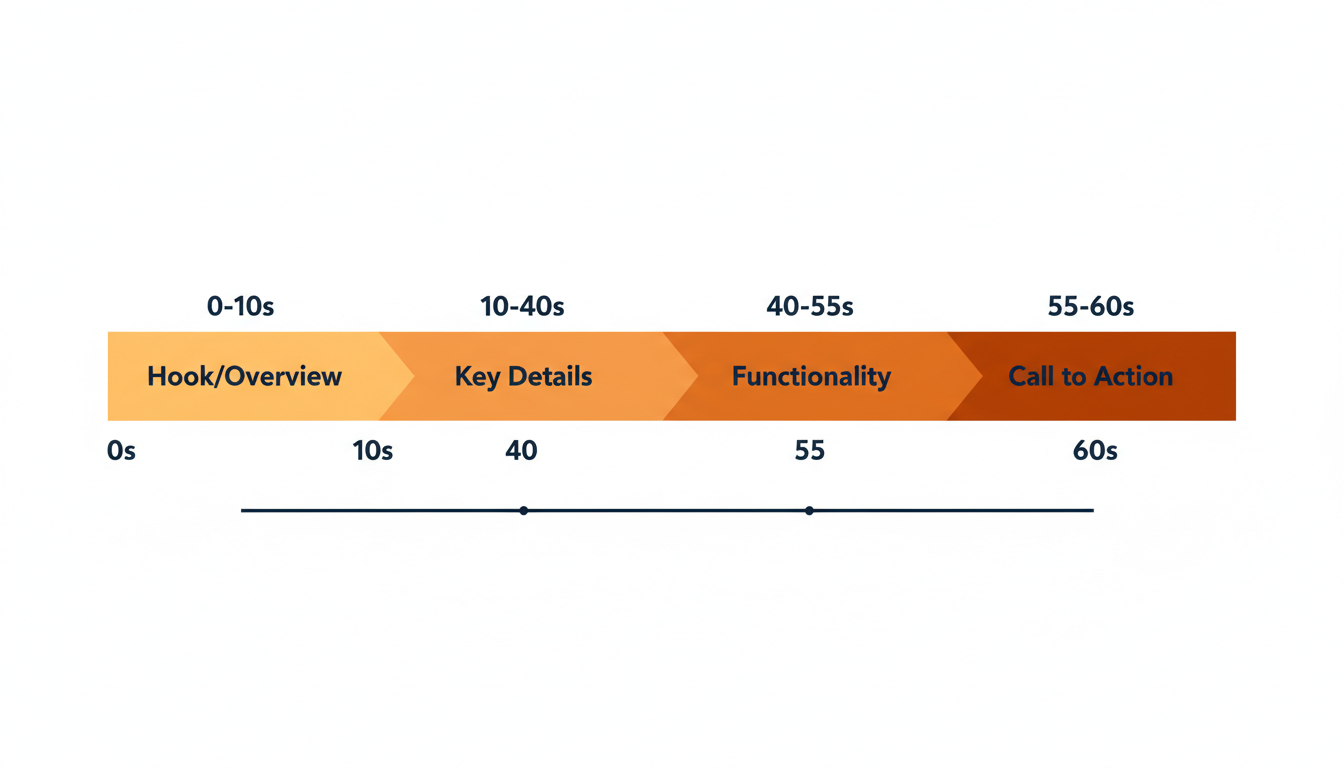
| Part | Duration | What to Show |
|---|---|---|
| Overview | First 10 seconds | Complete product — size, color, overall condition |
| Details | Middle 30–40 seconds | Close-ups, functionality, wear, condition |
| Closing | Final 10 seconds | Best angle, full set of items if applicable |
Do not start with a title card, an intro screen, or your logo. Start with the product. Buyers clicked on your listing to see the product, so show it to them immediately.
In the detail section, move deliberately but do not linger. Spend a few seconds on each angle or feature, then move on. For electronics, show it powered on. For clothing, show the fabric texture and labels. For collectibles, show any flaws or wear.
That is it. No narration required, though a brief spoken description can help for some categories. No background music unless it is relevant to the product. No text overlays. Just the product. For more product video techniques, see our product video tips for eBay sellers in 2026.
What to Include and What to Skip
Include anything that answers a likely buyer question:
- Does it work?
- What condition is it in?
- How big is it compared to something familiar?
- Are there any defects?
- What is included in the box?
Skip anything that is already obvious from the photos or listing text. You do not need to film the box from every angle. You do not need to zoom in on the brand logo for ten seconds. You do not need to show yourself unpacking the product. The buyer does not care about your unboxing experience.
For used and vintage items, focus on condition. Show the scratches, the wear patterns, the corners of the box. This is where video provides the most value, because photos can be misleading about condition. A slow pan across a vinyl record surface or a turntable spinning a record tells the buyer more about condition than any grading description. (See our full guide on showing product condition on video.)
For new or commodity products, focus on functionality and scale. Show the product being used. Put it next to a common object for size reference. Demonstrate any moving parts. Prove it works.
When You Have More to Show: Use Playlists
Sometimes 60 seconds genuinely is not enough. Maybe you are selling a lot of 20 vinyl records. Or a tool set with 50 pieces. Or a vintage stereo receiver with a dozen features worth demonstrating.
The answer is not one long video. The answer is multiple short videos in a playlist. Each clip covers one aspect: one record, one tool, one feature. The buyer can watch the clips that interest them and skip the rest.
eCommercePlayer supports multi-media players for exactly this reason. You can upload several clips and combine them into a single player with a playlist. The buyer sees all available clips and can choose which ones to watch.
A playlist of five 30-second clips is better than one 2.5-minute video. The total content is the same, but the buyer can jump to what matters to them. And your per-clip view counts tell you which aspects buyers care about most, so you can optimize future listings.
Viewer Drop-Off Is Real: The Numbers
If you are not convinced that shorter is better, here is what the data consistently shows across e-commerce video platforms:
| Time into Video | Viewers Still Watching |
|---|---|
| 30 seconds | ~80–85% |
| 60 seconds | ~60–65% |
| 90 seconds | ~45–50% |
| 2 minutes | below 35% |
| 3 minutes | fewer than 20% |
Those are averages. Some product categories hold attention better than others. A working vintage jukebox is more inherently interesting to watch than a phone case. But the trend is consistent: shorter videos retain more viewers, and every viewer who finishes your video is more likely to buy.
Think about it from the buyer's perspective. They are comparing listings. If your video gets to the point in 45 seconds and the competing listing has a 3-minute video that buries the important details, which listing is easier for the buyer to evaluate? The buyer's time is limited. Respect it. For the broader business case, see why product video increases sales.
Start With One Listing
If you have been making longer product videos, try the 60-second approach on your next listing. Record a quick clip: 10 seconds of the full product, 40 seconds of details, 10 seconds of the closing angle. Upload it to eCommercePlayer and embed the player thumbnail in your listing.
Compare your engagement and sales on that listing against similar listings where you used a longer video or no video at all. Most sellers who try the short-form approach stick with it because the results speak for themselves.
The free eCommercePlayer plan includes 5 clips, which is enough to test this on a few listings without spending anything.
For practical advice on filming quickly with gear you already own, see our guide on shooting product video with your smartphone. See what happens when you cut the fat and give buyers exactly what they need to make a decision.
Related Articles
Ready to add media to your listings?
Create your free account in under a minute. No credit card required.